Settings
Change how Codewhale works for you, in one window.
Works on: the desktop app. On the phone, your account is the only setting (see below). The web: not available yet.
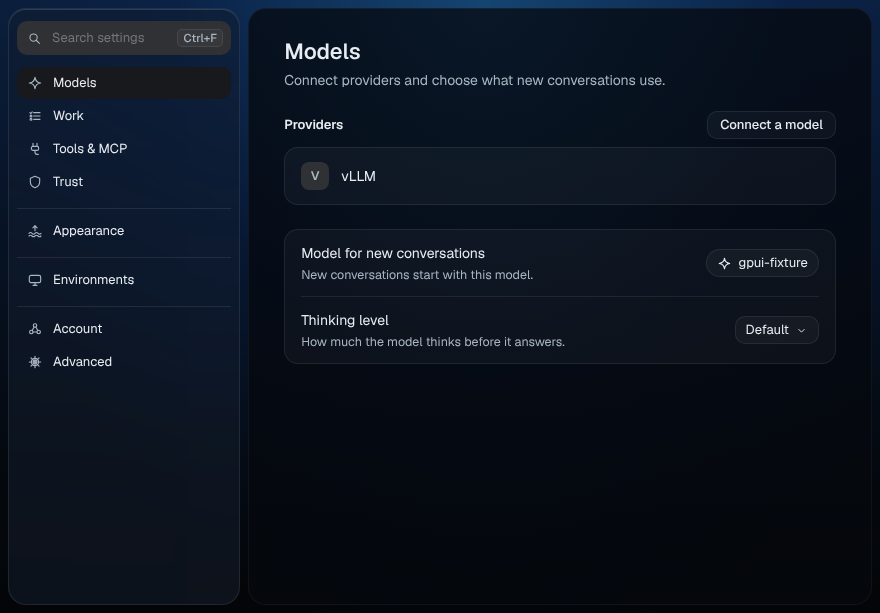
Open Settings
Do one of these:
- Press ⌘, on a Mac, or Ctrl+, on Windows and Linux.
- Choose File › Settings….
- Press Settings at the bottom of the sidebar.
- Pick Settings in the command palette, or type
/settings.
The desktop has one Settings window. Opening it again brings it to the front. Changes save as you make them, and every window picks them up at once.
Models, Work, Tools & MCP and Trust belong to a folder. With no folder open they say "Open a folder in Codewhale to change these."
Find a setting
Type in Search settings at the top of the list, or press ⌘F (Ctrl+F). Results are grouped by page; press a page's title to open it. Esc clears the search. When nothing matches: "No settings match".
Pages
| Page | What it's for |
|---|---|
| Models | Connect providers and choose what new conversations use. |
| Work | How conversations start and how the composer behaves. |
| Tools & MCP | Tools, MCP servers and plugins Codewhale can use. |
| Trust | What Codewhale may do without asking. |
| Appearance | How Codewhale looks and moves. |
| Environments | Where Codewhale does the work. |
| Account | Your Codewhale account. |
| Advanced | Settings most people never need. |
When you belong to an organization, its pages follow under its name; see Run your organization.
Read a row
- Set elsewhere: the value comes from somewhere else, such as a project file, and can't be changed here.
- Reset appears once a value differs from its default.
- Not available yet: the row can't be changed from the app yet.
- Set by and your organization's name, with a lock: your organization decides this, and you can't change it here.
Settings your organization manages
When your organization sets a rule, a locked row shows it on the page it affects:
| Page | Row | Shows |
|---|---|---|
| Tools & MCP | Connectors | Which connectors are allowed, for example "Only GitHub and Linear · no other MCP servers". |
| Environments | Cloud internet | What work on cloud computers can reach, for example "Package registries only". |
| Account | Monthly limit | "{limit} requests a month · resets {date}" |
These rows appear only when your organization has set that rule. On Environments, This Mac (or This computer on Windows and Linux) may say "Not managed by" and your organization's name: your own computer keeps its own settings.
Connect a model
On Models. See Connect a model: connect a provider, replace its key, disconnect it, and choose the model and Thinking level for new conversations.
Choose what asks first in new conversations
On Trust:
- Permission for new conversations: Ask, Auto-Review or Full Access. Each conversation can still change it from the shield in the composer; see Approvals and permissions.
- Start new conversations in: Plan, Work or Operate.
- Run commands: "Lets the whale run commands in your folder. What asks first still applies."
Add an MCP server
On Tools & MCP. These are the same as the connectors in Customize; see Connectors and skills.
- Press Add server.
- Give it a Name and a Command or address: a command such as
npx -y @modelcontextprotocol/server-everything, or anhttps://address. - Press Add.
Each row shows where it runs, how many tools it offers and its state: Ready, Running while it starts, Needs you · sign in, Blocked with the reason, or Resting. The switch turns it on or off. Press a name to see its tools. The ⋯ menu has Reconnect (R), Show tools (T), Turn off or Turn on (O) and Remove…, which asks once. Servers set in a project file say "Set in a project file" and are changed there.
Plugins
The Plugins row on Tools & MCP says "Not available yet". Manage plugins in Customize › Plugins; see Plugins.
Language, theme and ocean
On Appearance: Language (Same as system, English or 简体中文), Theme (Same as system, Light or Dark), Ocean life and Whale visits. They apply to every window at once and are kept on this computer. See Appearance.
Account
Signed out, Account has one Sign in row. Signing in from the desktop app: Not available yet; see Sign in. Signed in, it shows your name and organization, and Sign out, with your cloud computers below; see Your account and cloud computers.
Every setting
Generated from the app's settings list
(node apps/desktop/e2e/settings-docs.ts). Rows your organization manages
aren't in this table; see above.
| Page | Setting | What it does | Works today |
|---|---|---|---|
| Models | Providers | Yes | |
| Models | Model for new conversations | New conversations start with this model. | Yes |
| Models | Thinking level | How much the model thinks before it answers. | Yes |
| Work | Make room automatically | When a conversation gets long, older parts are summarized so the work can go on. | Yes |
| Work | Make room at | How full the conversation gets first. | Yes |
| Tools & MCP | MCP servers | Yes | |
| Tools & MCP | Plugins | Add tools, commands and agents from plugins. | Not available yet |
| Trust | Permission for new conversations | What asks first when a conversation starts. Each conversation can change it from the shield. | Yes |
| Trust | Start new conversations in | Plan looks and plans first. Work makes changes. Operate keeps going until the work is checked. | Yes |
| Trust | Run commands | Lets the whale run commands in your folder. What asks first still applies. | Yes |
| Trust | Anonymous usage counts | Version, session length and which features get used. Never your conversations, code or files. | Not available yet |
| Appearance | Language | The language Codewhale uses. | Yes |
| Appearance | Theme | The desktop shows the water in dark or light. | Yes |
| Appearance | Glass | How much of the water shows through panels. | Not available yet |
| Appearance | Ocean life | Fish, a jellyfish and bubbles in open water. Never behind words you are reading. | Yes |
| Appearance | Whale visits | A whale sometimes crosses the deep while Codewhale rests. | Yes |
| Appearance | Reduce motion | Codewhale follows your system setting. | Not available yet |
| Environments | This computer | Codewhale works in the folder you open. | Yes |
| Environments | Cloud computers | Keep working while this computer sleeps. | Not available yet |
| Account | Sign in | Share conversations and send work to cloud computers. | Not available yet |
| Advanced | Check for updates | Codewhale asks before it downloads or installs anything. | Yes |
| Advanced | Update channel | Beta gets new things first and may be rougher. | Yes |
| Advanced | Config files | Where Codewhale keeps these settings. | Not available yet |
On your phone
Tap the account button at the top of the conversation list. The account sheet shows your name and email, Organization with your role, and Membership: Not available yet. Under them is Sign out: "Your conversations stay in your account. Signing out leaves nothing on this phone." About, at the end, has the version, Terms of Service, Privacy Policy, Contact support and Open source licenses.
The phone follows the phone's language. Other settings: Not available yet.
On the web
Not available yet; see Codewhale on the web.
Related
Previous: Connectors and skills · Next: Appearance