Approvals and permissions
The whale asks before it runs a command or changes a file. You decide, one request at a time.
Works on: the desktop app; the phone app answers approvals. Web: not available yet.
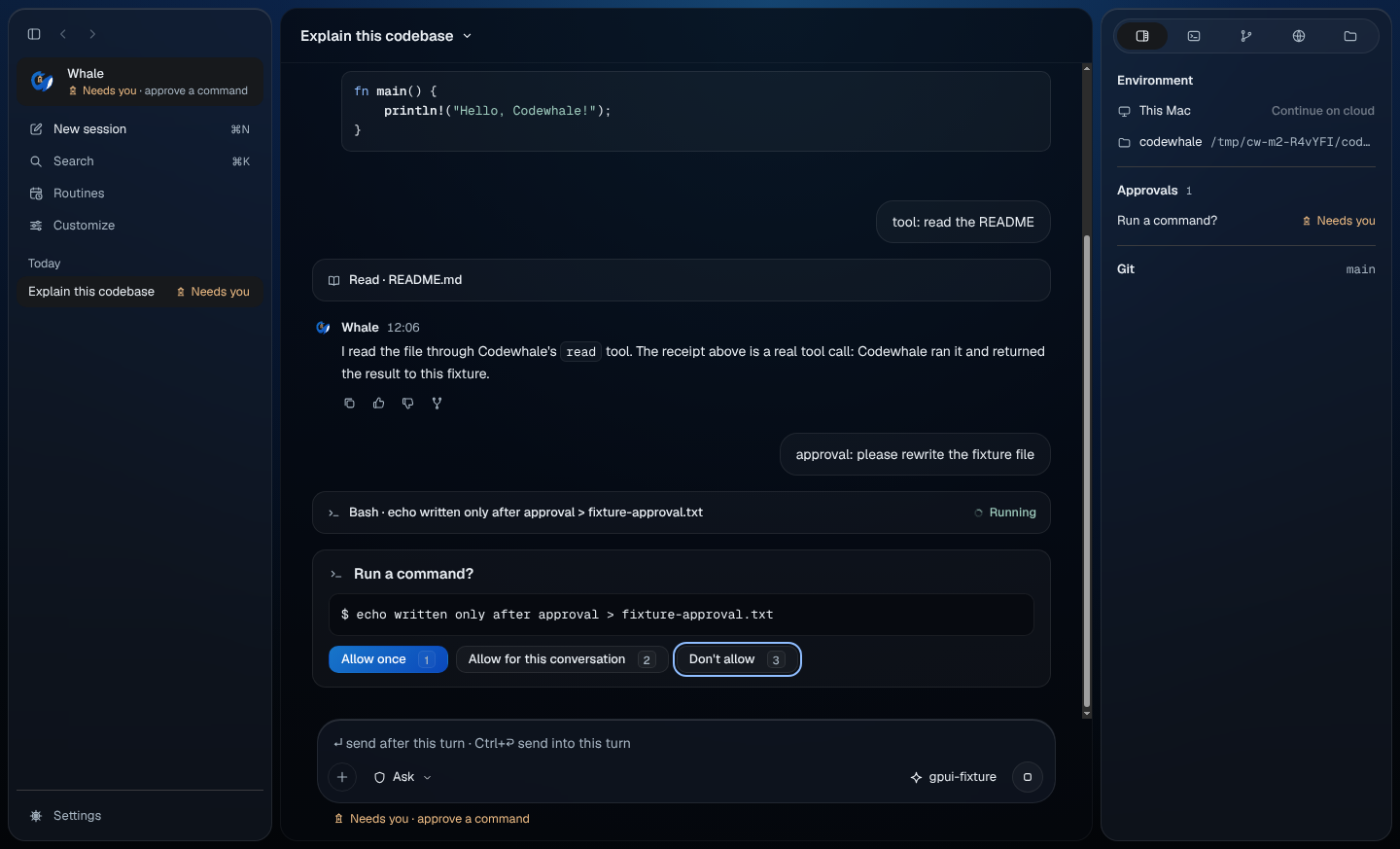
Answer an approval
An approval card has a plain heading, such as "Run a command?" or "Change a file?", the exact command, and what it's for. Choose one:
| Choice | Key | What it does |
|---|---|---|
| Allow once | 1 or Y | Allows this one request. |
| Allow for this conversation | 2 or A | Allows requests like this for the rest of this conversation. |
| Don't allow | 3, D or N | Refuses. Nothing runs. |
Some requests don't offer Allow for this conversation.
Afterwards the card says what was decided and when, for example "Allowed · once · 10:32" or "Not allowed · 10:33", and Activity in Overview lists "You allowed once" or "You didn't allow".
Answer from the keyboard
A new approval card never takes your focus, so you can keep typing. The line under the composer reads "Needs you · approve a command".
- Press ⇧⌘A (Ctrl+Shift+A on Windows and Linux) to jump to the oldest waiting card. Don't allow has the focus.
- Press 1, 2 or 3, or move with ← and → and press Enter.
Pressing Enter without reading is always the safe choice: it refuses. The number keys work only while the card has focus; in the composer they type.
Choose what asks first
The shield pill in the composer shows what asks first in this conversation. Press it, or press ⇧⌘E (Ctrl+Shift+E), and choose:
| Choice | What it does |
|---|---|
| Ask | Ask before tools that can make consequential changes. |
| Auto-Review | Review tool risk automatically and ask when a decision needs you. |
| Full Access | Run tools without asking first. Your folder rules still apply. |
A toast says "Permissions changed to …". The change applies to this conversation from the whale's next step.
On the launch card, before a conversation starts, the pill sets what new conversations start with. Settings › Trust › Permission for new conversations sets the same thing (Settings).
Plan, Work and Operate
The same menu has the mode:
| Mode | What it does |
|---|---|
| Plan | Research and plan first. Nothing changes. |
| Work | Makes the changes you ask for, with tools. |
| Operate | Works a request in parallel until it is checked. |
Work shows no chip. In Plan or Operate a chip beside the shield shows the mode; press it to change it. ⇧⌘M (Ctrl+Shift+M) moves to the next mode: Work, Operate, Plan, then Work again. A toast says "Mode changed to …". Tab never changes the mode or the permission; it only moves focus.
In a group conversation
- Only the owner and people with Can approve can answer. Approvals in Overview says who can, for example "Alex or Sam can approve".
- The shield pill can't be changed; its tooltip says "Not available yet". ⇧⌘E and ⇧⌘M do nothing.
See Groups for roles.
On the web
Not available yet.
On your phone
An approval opens on its own screen. Get there by tapping the "Needs you" line at the top of a conversation, the approval's card in the conversation, or a Codewhale link to the approval.
The screen shows the heading, the command and what it's for. Choose Don't allow or Allow once. The phone doesn't offer Allow for this conversation, and has no shield pill or mode.
If someone else already answered, or the request ended, the screen says "This no longer needs an answer" with Open conversation. See Codewhale on your phone.
Related
- Talk with the whale
- The work pane: review the change a request made
- Settings: what new conversations start with
Previous: Conversations and folders · Next: The work pane