Diagnostics
Send support what they need to help, without your keys, tokens or conversations.
Works on: the desktop app. Checked on Linux; macOS and Windows are not checked yet. The phone and the web: not available yet.
Copy diagnostics for support
Choose Help › Copy diagnostics. Codewhale puts a short report on your clipboard and says "Diagnostics are on your clipboard." Paste it into your message to support.
The report says:
- which version of Codewhale you have, and the system and language it runs on;
- whether updates are set up, and whether you're signed in;
- whether the Codewhale you run came with the app or was installed separately, and where;
- each open window's folder, whether it's working, and its version;
- the crash files kept on this computer, by name, size and time;
- recent problems Codewhale noticed, such as a window that stopped, and how Codewhale closed last time, with that run's problems;
- "Saved reports (n newest)": the start of the newest saved reports (up to three), so support sees what happened before.
It leaves out keys, tokens, sign-in tickets, passwords and email addresses,
and shows them as [redacted] or [email]. Folders inside your home folder
start with ~. Your conversations and files are never in it.
When a window stops
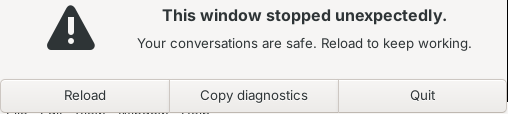
If a window stops unexpectedly, Codewhale says "This window stopped unexpectedly." and "Your conversations are safe."
- Reload brings the window back where you were.
- Copy diagnostics copies the report, then asks again.
- Quit closes Codewhale.
If a window stops responding, Codewhale says "This window isn't responding." Choose Wait to give it time, or Reload to start it again.
When Codewhale itself runs into a problem
Codewhale says "Codewhale ran into a problem and needs to restart." Choose Restart, Copy diagnostics or Quit.
These windows use the language Codewhale was showing, so they still speak Simplified Chinese if that's what you chose, even when the window that failed can't answer.

What stays on your computer
When a window stops or Codewhale itself runs into a problem, Codewhale saves
a report before it asks you anything, to a file only you can read, under
diagnostics/reports in its data folder. It keeps the newest ten. A window
that isn't responding is noted in the next report instead.
| System | Data folder |
|---|---|
| macOS | ~/Library/Application Support/Codewhale |
| Windows | %APPDATA%\Codewhale |
| Linux | ~/.config/Codewhale |
Crash files stay on this computer too. Codewhale never uploads them or the reports. Sending them is always your choice, by copying and pasting.
Related
Previous: Updates